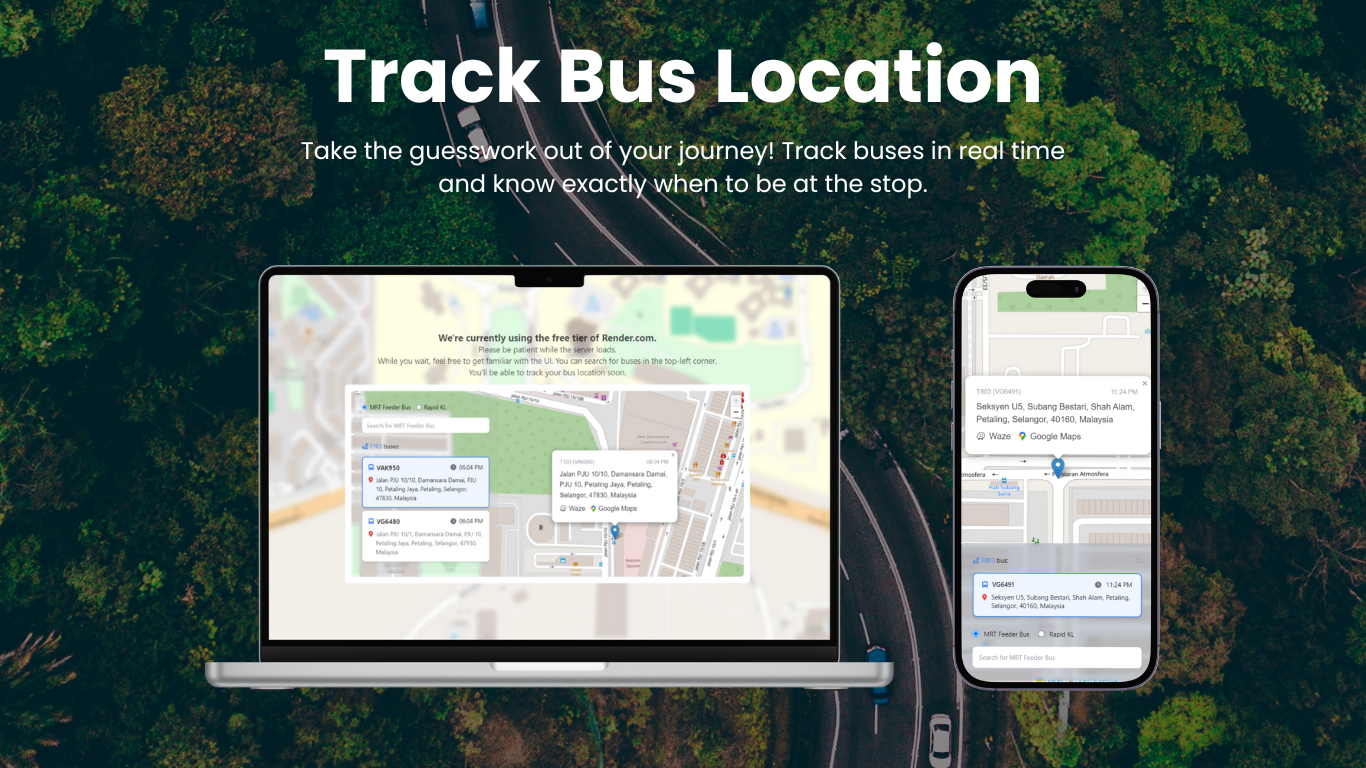
Bus Location Tracker: Fighting Malaysian Public Transport One API Call at a Time
The Malaysian Bus Struggle
I've always had some serious beef with Malaysian public transportation—especially buses!
Since high school, I've had to face this "hell": sometimes no buses would show up, and I'd have no idea when the next one was coming. Living in a rural area was definitely not for the weak! The bus would literally leave you behind if you didn't stand up and wave as it approached the stop. Talk about stress.
Even during my degree at Universiti Malaya, things only improved a little—the frequency was 30 minutes instead of 1 hour back home, but the uncertainty was still there. You'd never really know where your bus was or how long you'd be waiting.

not actually a bus stop, but honestly this is how waiting for the bus feels
Discovery: data.gov.my Has an API!
So when I found out that data.gov.my has this bus tracking API available, I immediately dove into exploring it! The API provides real-time GPS coordinates, route information, and even bus speed data. This was exactly what I needed to solve my bus timing problems.
Building the Solution
The Messy First Version
Initially, it was just showing all the available bus IDs with no clean UI - clutters everywhere. It worked, but it wasn't intuitive at all.
Learning and Rebuilding
After learning from my senior, I completely recreated it. Now the bus IDs are in a dropdown menu, the map is much bigger, and the whole website is way more intuitive to use.
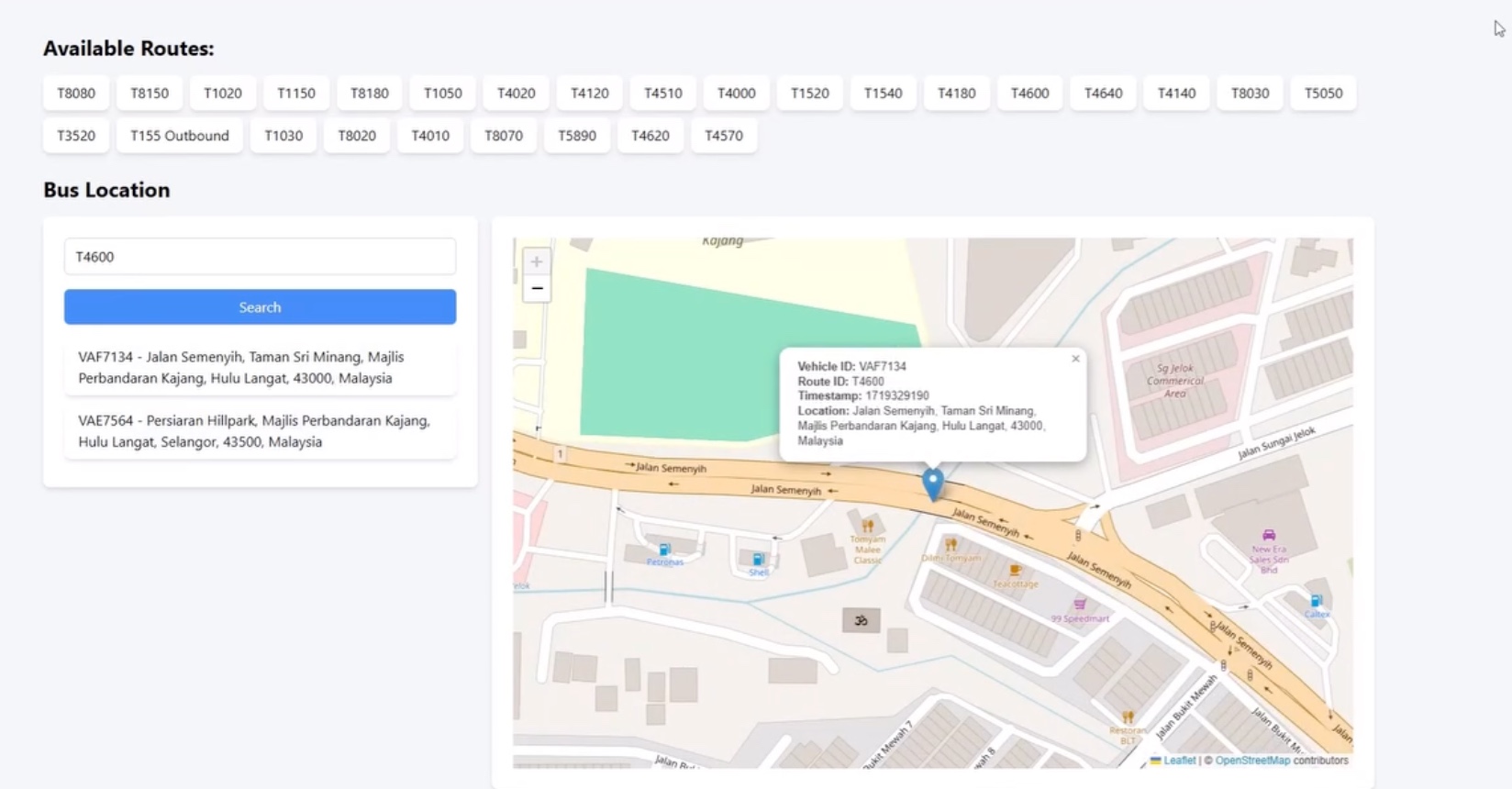
Before: Cluttered mess with all bus IDs everywhere
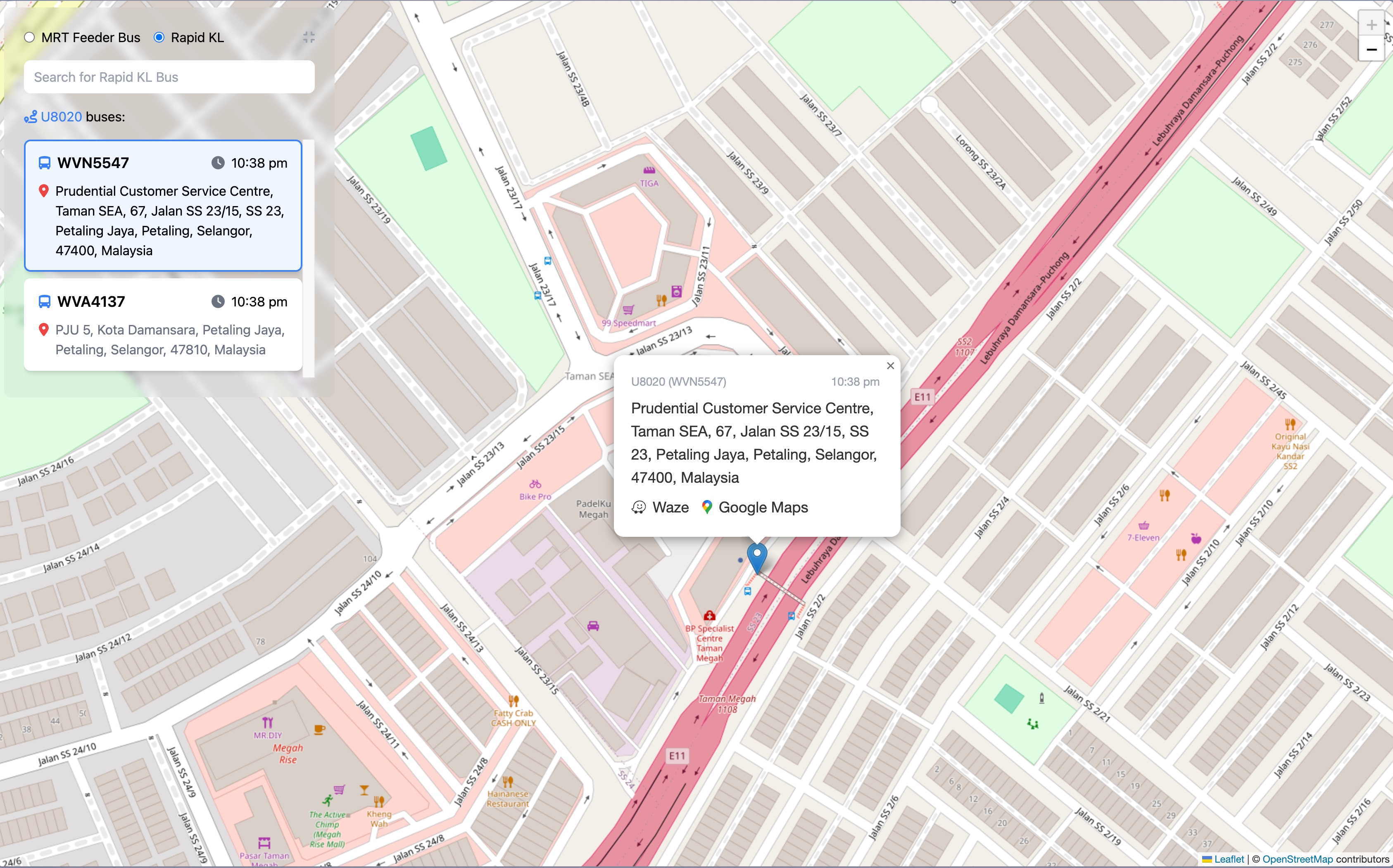
After: Clean dropdown interface with focus on the map
Technical Challenges
Getting the info I wanted was tricky. The GTFS-realtime data comes in protobuf format, which isn't exactly frontend-friendly. I had to work with two different bus feeds (feeder buses and Rapid KL) and transform the protobuf data into clean JSON responses.
@router.get("/vehicle/{route_id}")
def get_vehicle_by_route(route_id: str):
    print(f"Searching for vehicles on route: {route_id}")

    # Fetch from both feeder bus and Rapid KL feeds
    feeder_bus_content = fetch_gtfs_realtime_feed(FEEDER_BUS_URL)
    rapid_kl_content = fetch_gtfs_realtime_feed(RAPID_KL_URL)

    vehicles = []

    # Parse protobuf data from both feeds
    if feeder_bus_content:
        feeder_feed = gtfs_realtime_pb2.FeedMessage()
        feeder_feed.ParseFromString(feeder_bus_content)
        vehicles.extend([MessageToDict(entity.vehicle) for entity in feeder_feed.entity])

    if rapid_kl_content:
        rapid_kl_feed = gtfs_realtime_pb2.FeedMessage()
        rapid_kl_feed.ParseFromString(rapid_kl_content)
        vehicles.extend([MessageToDict(entity.vehicle) for entity in rapid_kl_feed.entity])

    # Filter for the specific route and clean up the data
    vehicles_on_route = []
    for vehicle in vehicles:
        vehicle_route_id = vehicle.get('trip', {}).get('routeId', 'N/A')
        if vehicle_route_id.lower() == route_id.lower():
            vehicle_id = vehicle.get('vehicle', {}).get('id', 'N/A')
            latitude = vehicle.get('position', {}).get('latitude')
            longitude = vehicle.get('position', {}).get('longitude')
            timestamp = vehicle.get('timestamp', 'N/A')

            if latitude and longitude:
                location_name = reverse_geocode(latitude, longitude)
                vehicles_on_route.append({
                    "vehicle_id": vehicle_id,
                    "route_id": vehicle_route_id,
                    "latitude": latitude,
                    "longitude": longitude,
                    "timestamp": int(timestamp),
                    "location": location_name or "Unknown location"
                })

return {"vehicles": vehicles_on_route}@router.get("/vehicle/{route_id}")
def get_vehicle_by_route(route_id: str):
print(f"Searching for vehicles on route: {route_id}")
# Fetch from both feeder bus and Rapid KL feeds
feeder_bus_content = fetch_gtfs_realtime_feed(FEEDER_BUS_URL)
rapid_kl_content = fetch_gtfs_realtime_feed(RAPID_KL_URL)
vehicles = []
# Parse protobuf data from both feeds
if feeder_bus_content:
feeder_feed = gtfs_realtime_pb2.FeedMessage()
feeder_feed.ParseFromString(feeder_bus_content)
vehicles.extend([MessageToDict(entity.vehicle) for entity in feeder_feed.entity])
if rapid_kl_content:
rapid_kl_feed = gtfs_realtime_pb2.FeedMessage()
rapid_kl_feed.ParseFromString(rapid_kl_content)
vehicles.extend([MessageToDict(entity.vehicle) for entity in rapid_kl_feed.entity])
# Filter for the specific route and clean up the data
vehicles_on_route = []
for vehicle in vehicles:
vehicle_route_id = vehicle.get('trip', {}).get('routeId', 'N/A')
if vehicle_route_id.lower() == route_id.lower():
vehicle_id = vehicle.get('vehicle', {}).get('id', 'N/A')
latitude = vehicle.get('position', {}).get('latitude')
longitude = vehicle.get('position', {}).get('longitude')
timestamp = vehicle.get('timestamp', 'N/A')
if latitude and longitude:
location_name = reverse_geocode(latitude, longitude)
vehicles_on_route.append({
"vehicle_id": vehicle_id,
"route_id": vehicle_route_id,
"latitude": latitude,
"longitude": longitude,
"timestamp": int(timestamp),
"location": location_name or "Unknown location"
})
return {"vehicles": vehicles_on_route}Here's what the API response from my bus location tracker looks like, for a bus with route id of T464:
{
  "vehicles": [
    {
      "vehicle_id": "VAE7593",
      "route_id": "T464",
      "latitude": 2.971759,
      "longitude": 101.789795,
      "timestamp": 1754837857,
      "location": "Jalan Reko, Taman Kajang Sentral, Kajang 2, Majlis Perbandaran Kajang, Hulu Langat, Selangor, 43650, Malaysia"
    },
    {
      "vehicle_id": "VAF7116",
      "route_id": "T464",
      "latitude": 2.92059,
      "longitude": 101.763084,
      "timestamp": 1754837842,
      "location": "Jalan Bangi, Bangi Lama, Majlis Perbandaran Kajang, Hulu Langat, Selangor, 43600, Malaysia"
    }
  ]
}
{
"vehicles": [
{
"vehicle_id": "VAE7593",
"route_id": "T464",
"latitude": 2.971759,
"longitude": 101.789795,
"timestamp": 1754837857,
"location": "Jalan Reko, Taman Kajang Sentral, Kajang 2, Majlis Perbandaran Kajang, Hulu Langat, Selangor, 43650, Malaysia"
},
{
"vehicle_id": "VAF7116",
"route_id": "T464",
"latitude": 2.92059,
"longitude": 101.763084,
"timestamp": 1754837842,
"location": "Jalan Bangi, Bangi Lama, Majlis Perbandaran Kajang, Hulu Langat, Selangor, 43600, Malaysia"
}
]
}The trickiest part was dealing with the protobuf format and making sure I could handle both feeder bus and Rapid KL data sources simultaneously. I also added reverse geocoding to show actual location names instead of just coordinates.
My Approach vs Moovit
There's Moovit available, but my website focuses solely on where the exact bus is currently at. While Moovit focuses on journey estimates and you need to search around to find where buses are right now, mine just focuses on where the buses are for any route ID.
During my degree, I knew I always used the T815 bus, so I'd just use the website to estimate the time I needed to be downstairs waiting for the bus. This saved me a lot of time and made it much easier to plan my timing - no more standing around wondering if the bus would ever show up!
Tech Stack
- Frontend: Vue.js with interactive mapping
- Backend: FastAPI (Python), Gemini AI for data processing
- Data Source: data.gov.my GTFS real-time API
- Hosting: Railway.com
- Real-time Updates: WebSocket connections for live bus positions
Key Features
- Real-time bus locations with GPS coordinates
- Clean dropdown interface for selecting bus routes
- Live speed and direction data
- Mobile-responsive for checking on the go
- Focused on current location, not journey planning
What I Learned
- Working with GTFS-realtime protobuf data and transforming it to JSON
- Handling multiple data sources (feeder bus vs Rapid KL feeds)
- The importance of clean UI/UX when dealing with complex real-time data
- Sometimes the simplest solution (just show me where the bus is!) is the most useful
- Adding reverse geocoding to make coordinates more meaningful
- Real-time data synchronization between multiple API endpoints
The Reality Check
The app is still running, but honestly, no one else was using it except me back then. Maybe other students didn't face the same bus anxiety I did, or they just stuck with Moovit. But for me, it solved exactly the problem I had - knowing where my T815 was without having to guess.
The Impact
What started as frustration with Malaysian public transport turned into a practical solution for my daily commute. Sure, it might be a niche use case, but being able to see exactly where your bus is in real-time instead of playing the guessing game? That's worth building.
From "Where the hell is my bus?" to "Okay, T815 is 5 minutes away" - sometimes the best projects are the ones that solve your own daily annoyances.
Links:
- Live tracker: bus-location-tracker.rulkimi.com
- Code: github.com/rulkimi/bus-location-server
Fighting Malaysian public transport, one real-time coordinate at a time!